Kenerate AI

提示词库

AI 提示词库

汇集全球创作者的精选图像、视频与建站提示词。复制任意一条,替换主体或风格,即可用最新模型生成。

15,630 条提示词 · 每日更新 · 完全免费

共 242 条

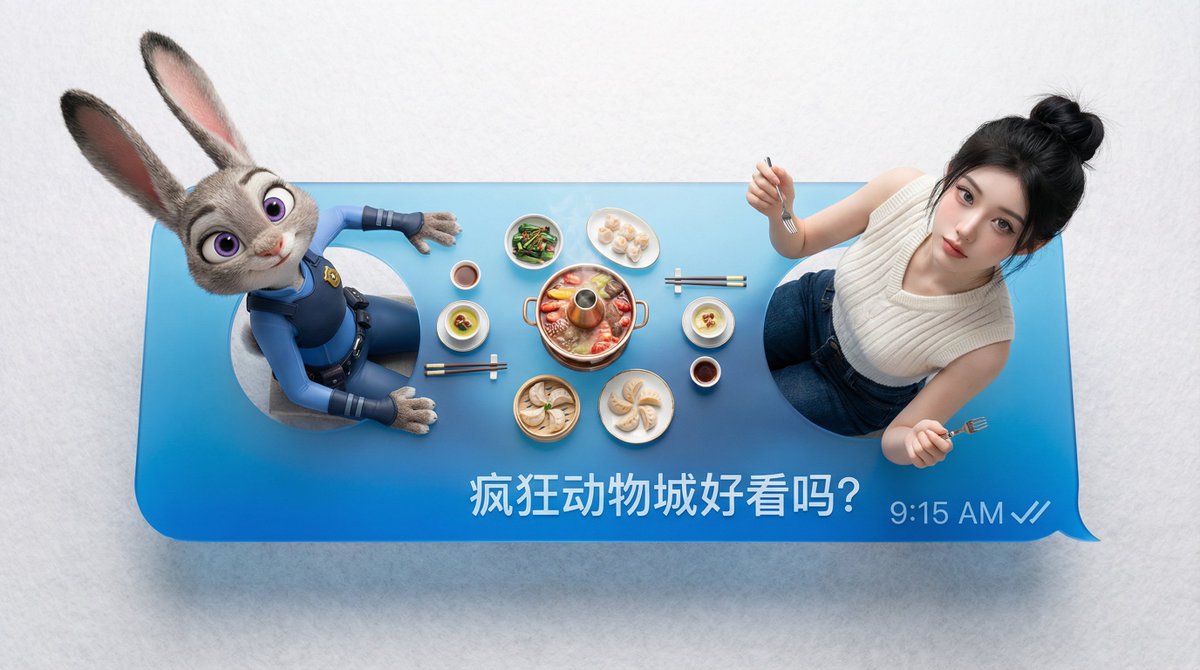
Customizable Chat Interface Image Generation Prompt

Customizable Chat Interface Image Generation Prompt

"Platform": " {argument name="platform" default="WeChat"}", "Left_Person": " {argument name="left person" default="Enter name or upload reference image"}", "Right_Person": "{argument name="right person" default="Enter name or upload reference image"}", "Message_Text": "{argument name="message text" default="Enter text"}"

Studio Portrait with Digital UI Overlay

Studio Portrait with Digital UI Overlay

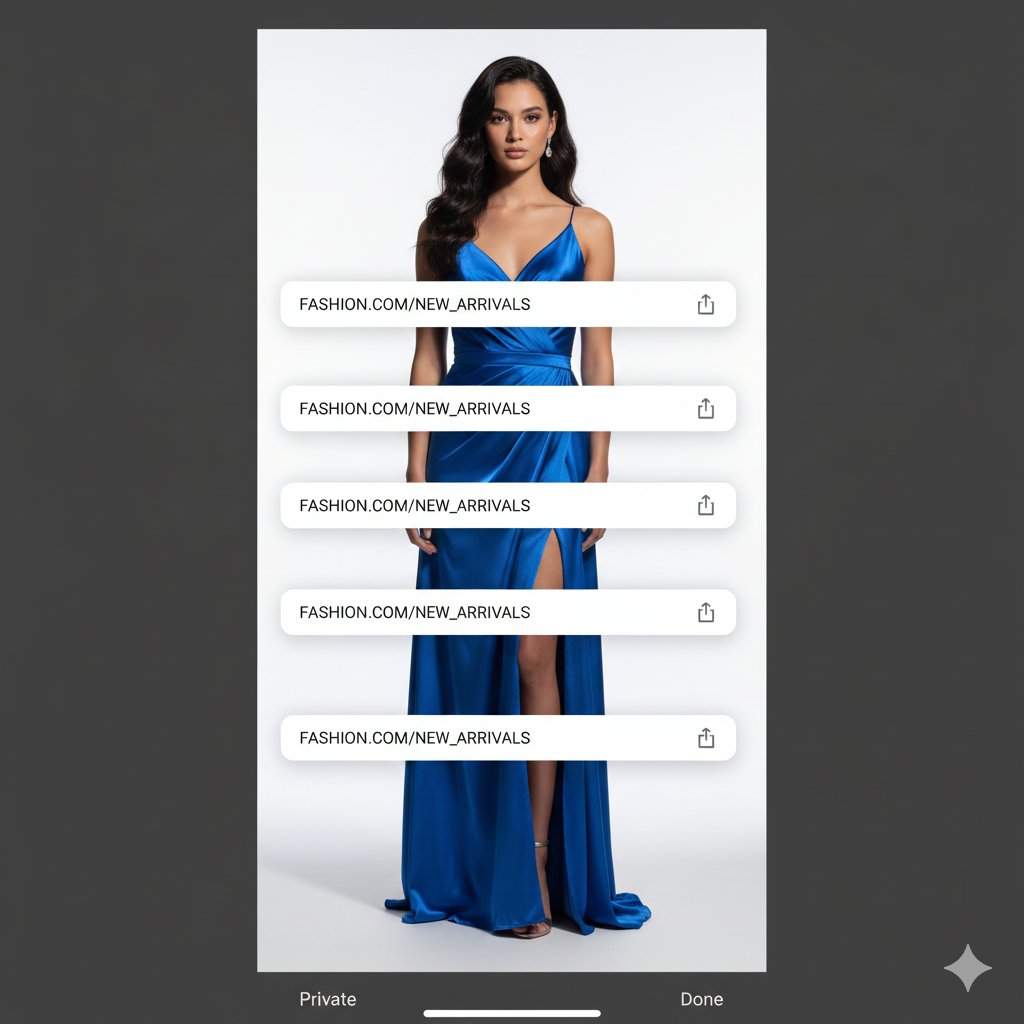
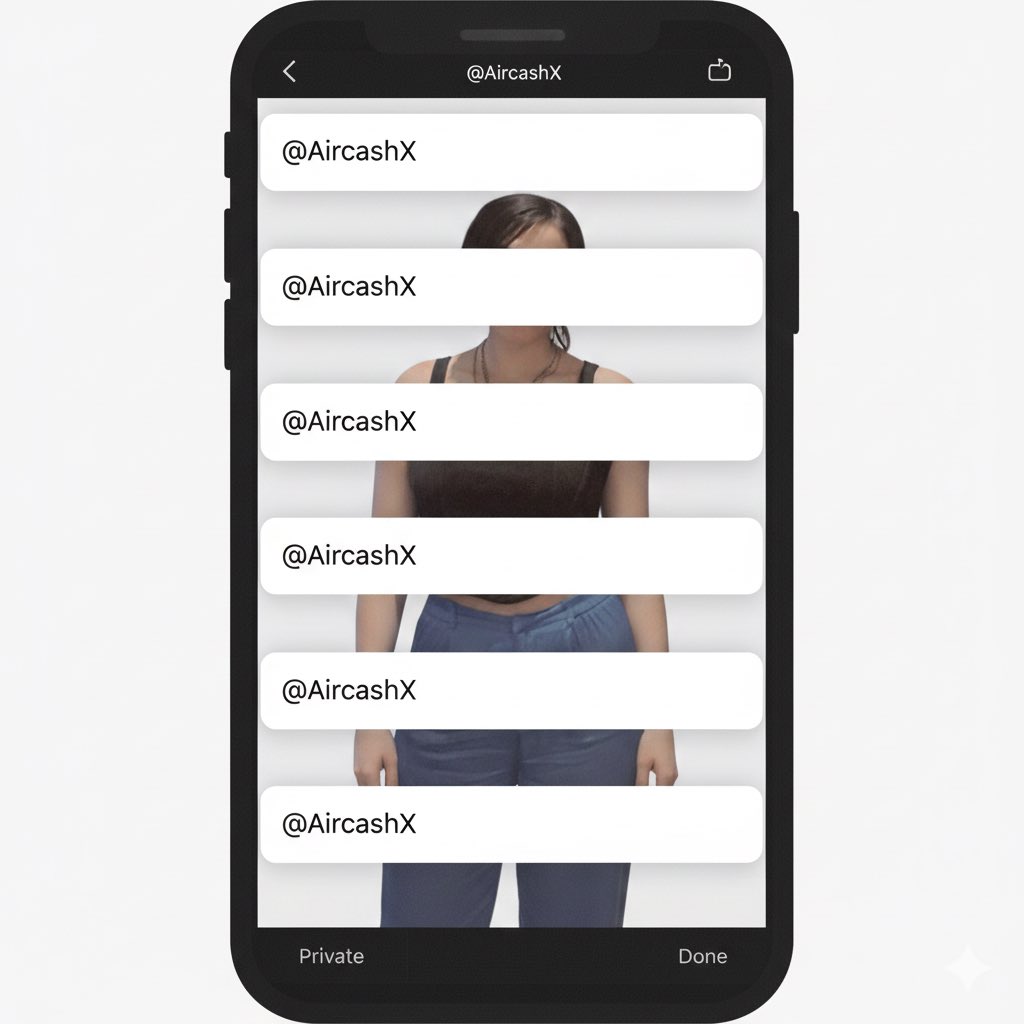
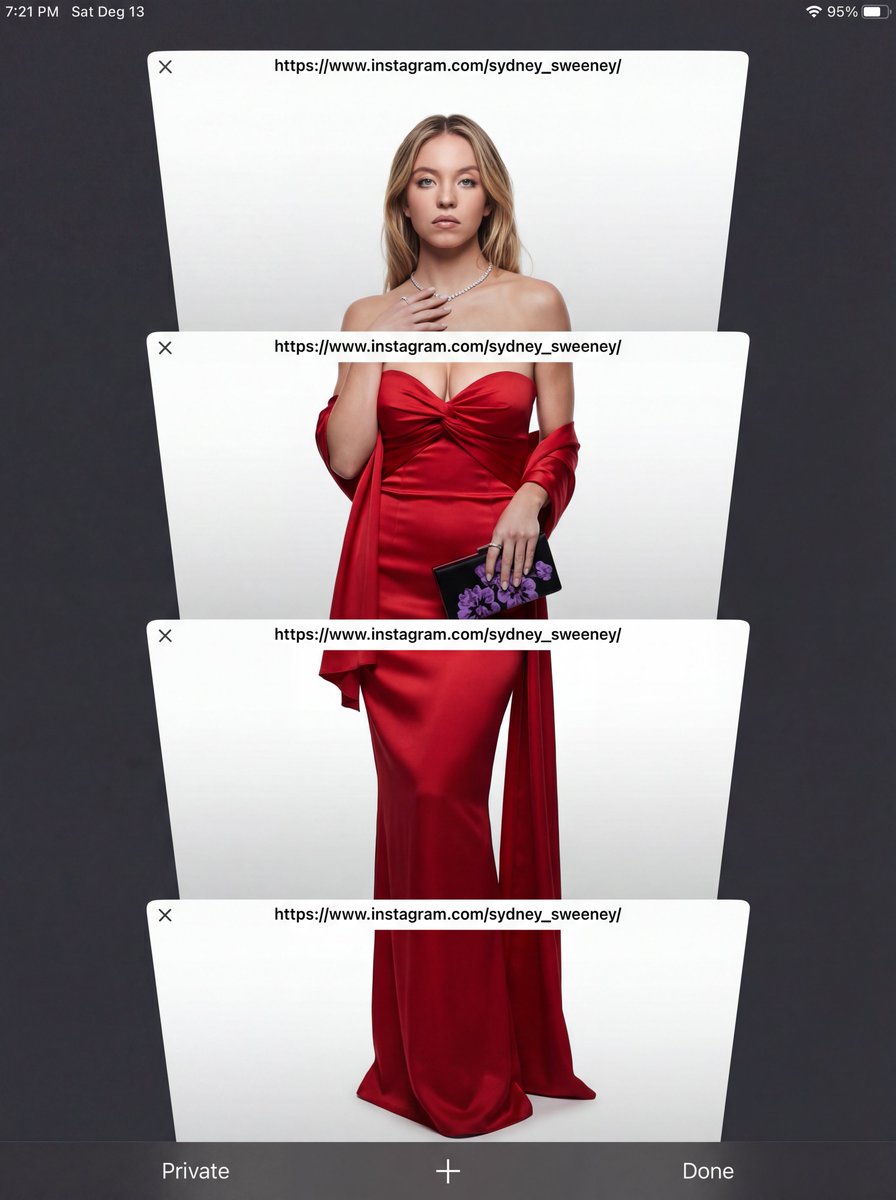
Create a full-body studio portrait of {argument name="subject name" default="[SUBJECT NAME]"} with {argument name="expression" default="[EXPRESSION]"}, facing the camera against a clean {argument name="background type" default="[BACKGROUND TYPE]"}. Use soft, dimensional lighting for depth. Overlay a dark mobile UI frame with four stacked white browser windows, each showing "{argument name="insert text" default="[INSERT TEXT]"}", blending realistic photography with minimal digital design.

Studio Portrait with Digital UI Overlay

Studio Portrait with Digital UI Overlay

Subject Reference: A full-body portrait of [INSERT SUBJECT NAME]. Scene Description: A full-body, centered portrait of the subject [INSERT POSE DESCRIPTION]. The subject has [INSERT EXPRESSION], staring directly at the camera. The immediate background behind the subject is a [INSERT BACKGROUND TYPE, e.g., seamless, pure high-key white studio backdrop]. Crucially, the subject is lit with volumetric studio lighting that creates deep definitions, realistic shadows, and a strong 3D quality on her body and the folds of the outfit, distinguishing her sharply from the flat background without casting shadows on the floor. CRITICAL DETAIL (UI Layer): The entire photographic image is digitally layered beneath a simulated mobile phone browser interface overlay. Four distinct, clean, white, rectangular browser window elements are stacked vertically and angled slightly, segmenting the subject. Each window bar contains the sharp text '{argument name="link text" default="[INSERT LINK OR TEXT HERE]"}'. The area outside the active white browser windows is a solid, uniform, dark charcoal gray/black matte UI frame, with absolutely no light bleed or color gradients. Style: Hybrid Composition: A highly realistic, three-dimensional studio photograph with deep color depth, overlaid with flat, clean digital graphics. Lighting Quality: Specific volumetric studio lighting focused ONLY on the subject. Soft, directional light from slightly off-center to sculpt the body and the rich texture of the fabric, creating depth. The background must remain completely flat. Color Palette: High contrast. {argument name="outfit color" default="[INSERT OUTFIT COLOR]"} outfit against {argument name="background color" default="[INSERT BACKGROUND COLOR]"} backdrop, framed by the dark matte gray UI. Texture and Mood: Realistic skin and rich fabric texture contrasting with the smooth digital elements of the UI. Intentional inclusion of subtle digital noise/grain to mimic a screen capture. Full body, centered portrait. Ensure the head and feet are fully within the frame before segmentation. Angle: Straight eye-level view, perpendicular to the subject. Framing Elements: Four overlapping, white browser windows/tabs. The pose is elegant and fluid. The bottom interface elements (e.g., 'Private', 'Done') must be clean and visible. Focal Length: Standard portrait lens (approx. 50mm equivalent) for realistic proportions. Camera Type: Simulated high-quality smartphone screen capture of a professional photo. Depth of Field: Shallow enough to focus sharply on the subject, allowing the background to be soft. Post Processing: Clean digital segmentation. Contrast adjusted to enhance depth. Avoid Keywords: Floor shadows, flat lighting, 2D look, inconsistent UI color, bleeding colors, HDR, oversharpened. Location: Simulated E-commerce studio ([INSERT BACKGROUND TYPE]).

Face-to-Career Matching Composite Image Generator

Face-to-Career Matching Composite Image Generator

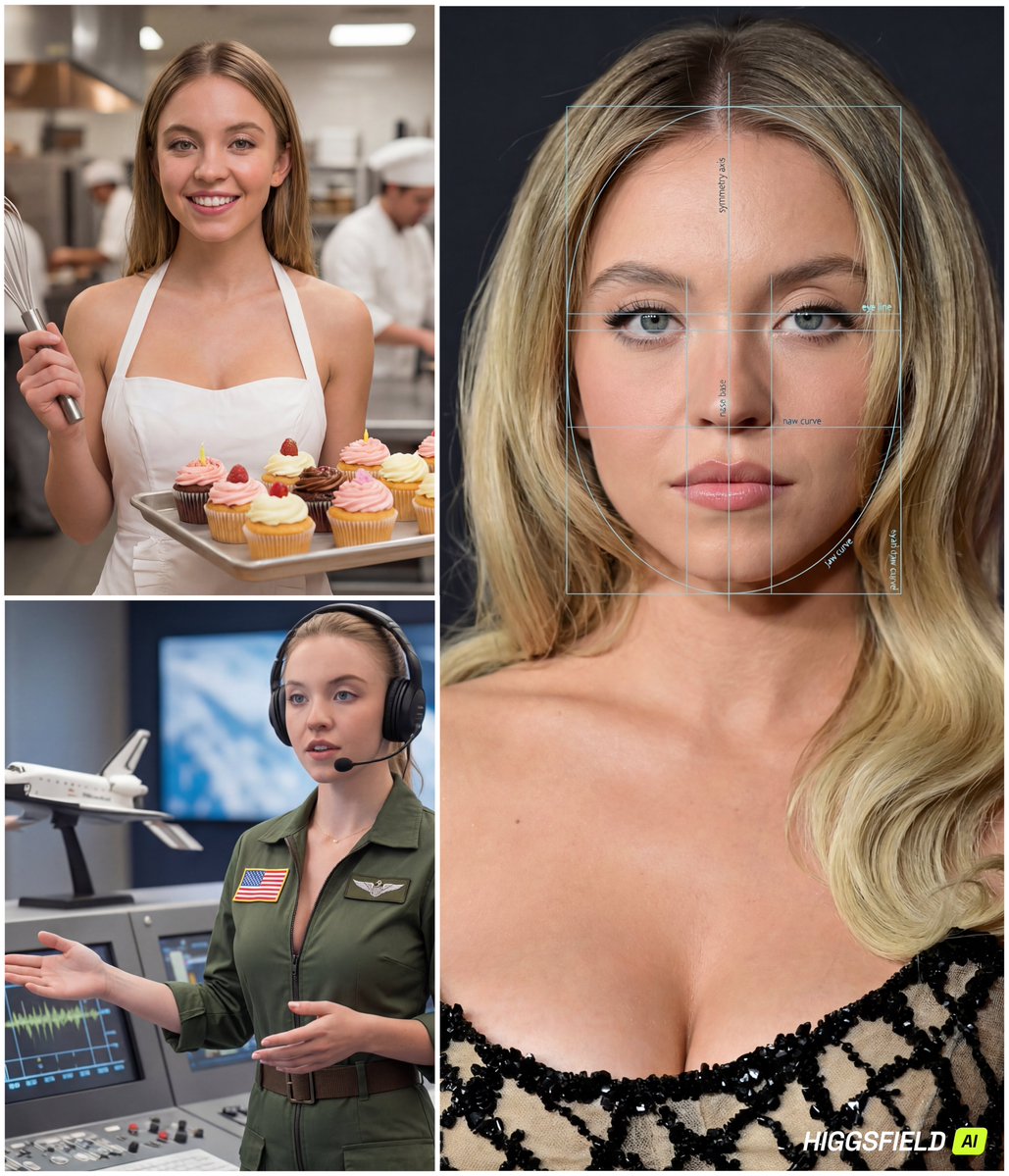
{ "referenced_image_ids": ["<PASTE_INPUT_IMAGE_ID_HERE>"], "size": "1024x1536", "n": 1, "prompt": "Create a single composite image (a clean 4-panel collage) based on the provided reference face. The final output must contain: (A) one LARGE panel on the left (about 65% width, full height) showing a premium 'face analysis' portrait of the same person; and (B) three SMALL panels stacked vertically on the right (about 35% width) showing the SAME person in three different careers.\n\nCRITICAL CAREER-SELECTION RULE:\n- The three careers must be selected by YOU based on the person's facial vibe and overall appearance in the reference (e.g., perceived temperament, style, presence, confidence, softness/seriousness, elegance/athleticism, creative/analytical vibe). Do NOT pick random jobs.\n- Choose careers that feel plausibly aligned with the person’s look and presence (\"face-to-career matching\" concept).\n- The three careers must be DISTINCT and cover different archetypes (e.g., one corporate/strategic, one creative/media, one technical/field). Avoid repeating similar industries.\n- Keep the choices fun and flattering, but still believable.\n\nGLOBAL RULES (apply to all panels):\n- The person must look like the same individual in all panels (consistent facial features, hairline, eye shape/color, skin tone, proportions).\n- Realistic, high-end editorial photography style.\n- Do NOT add any real names, IDs, biometric scores, or identity claims. This is illustrative only.\n- Avoid heavy text. Minimal labels allowed only in the analysis panel.\n\nPANEL A (LEFT, LARGE): 'FACE ANALYSIS' PORTRAIT\n- Close-up, centered, symmetrical portrait (head and upper neck), studio lighting, sharp focus.\n- Overlay a semi-transparent facial analysis grid: symmetry axis, eye-line, nose base line, jaw curve arcs, proportional guides (golden ratio style).\n- Add subtle, minimal micro-labels in English such as: 'symmetry axis', 'eye line', 'jaw curve', 'proportion guide'. Keep labels tiny and tasteful.\n- Make it look like a premium aesthetic/cosmetic analysis diagram (modern UI overlay, not medical).\n\nPANELS B/C/D (RIGHT, THREE SMALL PANELS): CAREER PORTRAITS\nFor each of the three chosen careers, depict:\n1) A strongly job-accurate outfit (uniform/PPE/tools/accessories appropriate to the role).\n2) A clear environment that matches the job (office, studio, set, lab, site, outdoors, etc.).\n3) A light playful twist that fits the role (a charming prop, a witty moment, a fun-but-realistic action), without becoming cartoonish.\n- Keep the face visible and recognizable in each panel.\n- Use cinematic lighting and shallow depth-of-field; backgrounds should be rich but not cluttered.\n\nCOMPOSITION & QUALITY:\n- Output must be one single image containing all 4 panels with thin white borders between panels.\n- Cohesive color grading a"

E-commerce Studio Portrait with UI Overlay

E-commerce Studio Portrait with UI Overlay

Subject Reference: A full-body portrait of [INSERT SUBJECT NAME]. Scene Description: A full-body, centered portrait of the subject [INSERT POSE DESCRIPTION]. The subject has [INSERT EXPRESSION], staring directly at the camera. The immediate background behind the subject is a [INSERT BACKGROUND TYPE, e.g., seamless, pure high-key white studio backdrop]. Crucially, the subject is lit with volumetric studio lighting that creates deep definitions, realistic shadows, and a strong 3D quality on her body and the folds of the outfit, distinguishing her sharply from the flat background without casting shadows on the floor. CRITICAL DETAIL (UI Layer): The entire photographic image is digitally layered beneath a simulated mobile phone browser interface overlay. Four distinct, clean, white, rectangular browser window elements are stacked vertically and angled slightly, segmenting the subject. Each window bar contains the sharp text '[INSERT LINK OR TEXT HERE]'. The area outside the active white browser windows is a solid, uniform, dark charcoal gray/black matte UI frame, with absolutely no light bleed or color gradients. Style: Hybrid Composition: A highly realistic, three-dimensional studio photograph with deep color depth, overlaid with flat, clean digital graphics. Lighting Quality: Specific volumetric studio lighting focused ONLY on the subject. Soft, directional light from slightly off-center to sculpt the body and the rich texture of the fabric, creating depth. The background must remain completely flat. Color Palette: High contrast. {argument name="outfit color" default="[INSERT OUTFIT COLOR]"} outfit against {argument name="background color" default="[INSERT BACKGROUND COLOR]"} backdrop, framed by the dark matte gray UI. Texture and Mood: Realistic skin and rich fabric texture contrasting with the smooth digital elements of the UI. Intentional inclusion of subtle digital noise/grain to mimic a screen capture. Full body, centered portrait. Ensure the head and feet are fully within the frame before segmentation. Angle: Straight eye-level view, perpendicular to the subject. Framing Elements: Four overlapping, white browser windows/tabs. The pose is elegant and fluid. The bottom interface elements (e.g., 'Private', 'Done') must be clean and visible. Focal Length: Standard portrait lens (approx. 50mm equivalent) for realistic proportions. Camera Type: Simulated high-quality smartphone screen capture of a professional photo. Depth of Field: Shallow enough to focus sharply on the subject, allowing the background to be soft. Post Processing: Clean digital segmentation. Contrast adjusted to enhance depth. Avoid Keywords: Floor shadows, flat lighting, 2D look, inconsistent UI color, bleeding colors, HDR, oversharpened. Location: Simulated E-commerce studio ({argument name="background type" default="[INSERT BACKGROUND TYPE]"}).

Freepik Prompt Share with Nano Banana Pro

Freepik Prompt Share with Nano Banana Pro

A stylized, minimalist vector illustration of a {argument name="subject" default="person working on a laptop"} surrounded by abstract geometric shapes, vibrant color palette, clean lines, suitable for a modern website banner, Freepik style.

Felted Wool Smartphone Lock Screen Music Player

Felted Wool Smartphone Lock Screen Music Player

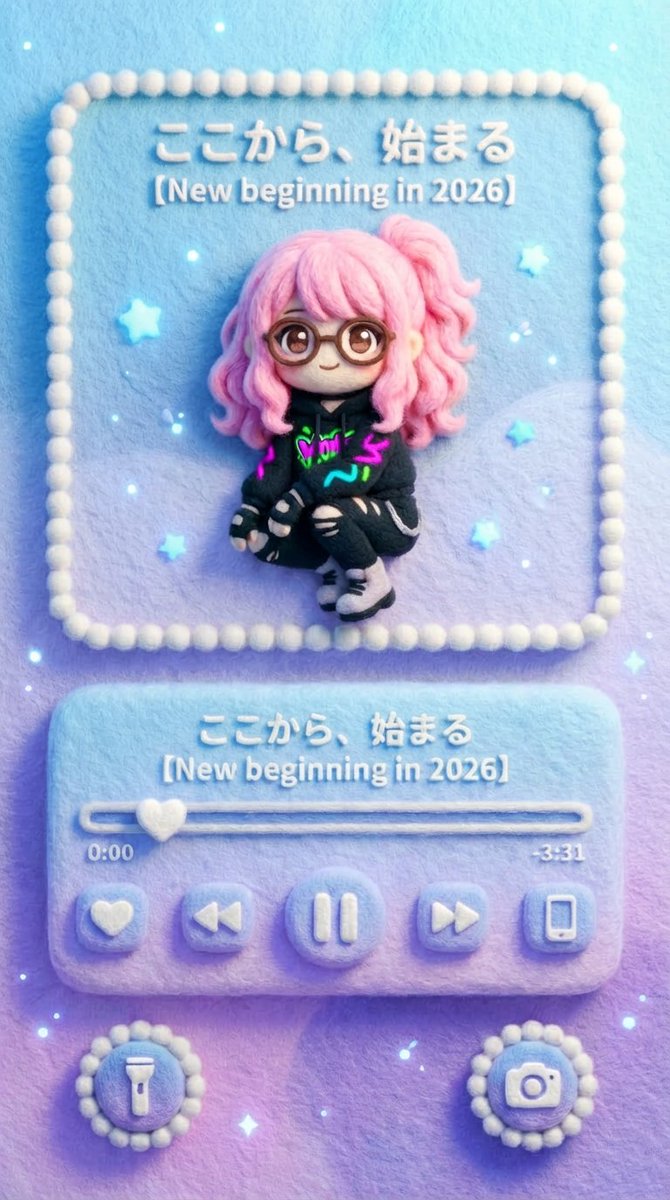
### (Smartphone Lock Screen × Felted Wool Music Player) Visual representation of a music player UI displayed on a smartphone lock screen. The aspect ratio is vertical (smartphone screen ratio), with a flat composition viewed from the front. The entire image has a three-dimensional, handmade texture, as if made from felted wool/needle felting. All UI elements, text, icons, and borders are made of felt material. Screen Composition (Lock Screen Layout) Top: Album Art Display Area A square-like album art display frame, similar to the music player on an iOS / Android lock screen, is placed in the upper center of the lock screen. This album art section is the [Input Image]. The content and style of the replacement image are free (photos, illustrations, cityscapes, characters, etc.). However, the final output will be completely re-rendered in a felted wool/felt embroidery style. - Outlines are slightly blurred - Colors are softly blended - Fiber unevenness is visible The style differences of the original image are not retained; only the texture is completely unified. Center: Music Player UI Below the album art is the music player control area specific to smartphone lock screens. - Song title display - Artist name display - Playback bar (progress) - Play / Pause button - Previous / Next button All are arranged as rounded felt buttons. The text on the playback bar is "{argument name="playback bar text" default="ここから、始まる"}" The song title/series name section is "{argument name="song title" default="【New beginning in 2026】"}" Time display: 0:00 / -3:31 Both text and numbers have a texture as if embroidered or sewn with felt. Bottom: Lock Screen Shortcuts At the bottom of the screen are round shortcut icons, like those on a lock screen. - Flashlight - Camera These are placed on the left and right as fluffy felt icons. Atmosphere, Color, and Light Automatic Color Matching Rule (Important) The main color tone, atmosphere, and brightness of the album art [Input Image] are automatically analyzed and reflected in the overall background color of the screen. The background area, excluding the music player UI (album display/control part), shares the color world view of the album art. Background expression is one of the following, or a combination: - Solid felt background using the main color of the album art - Gentle gradient extracted from the album art colors - Abstracted/simplified felt pattern derived from the album art background The background is kept subtle and does not interfere with the player UI and album art. However, the color consistency ensures that the entire screen forms a single album world view. Regardless of the color pattern, the background material must always retain the texture of felted wool/needle felting. Background expression is one of the following, or a combination: - Solid felt background using the main color of the album art - Gentle gradient extracted from the album art colors - Abstracted/simplified felt pattern derived from the album art background. The background is kept subtle and does not interfere with the player UI and album art. However, the color consistency ensures that the entire screen forms a single album world view. Regardless of the color pattern, the background material must always retain the texture of felted wool/needle felting. Small particles of light (gentle point light) are scattered as decoration on the lock screen. The light is subtle and soft, like a smartphone screen at night. The overall impression is - Cute - Gentle - Quiet - Touchable. The world view is **"A smartphone lock screen made of felt."**

Landing Page Design for Leather Journals (Split Screen)

Landing Page Design for Leather Journals (Split Screen)

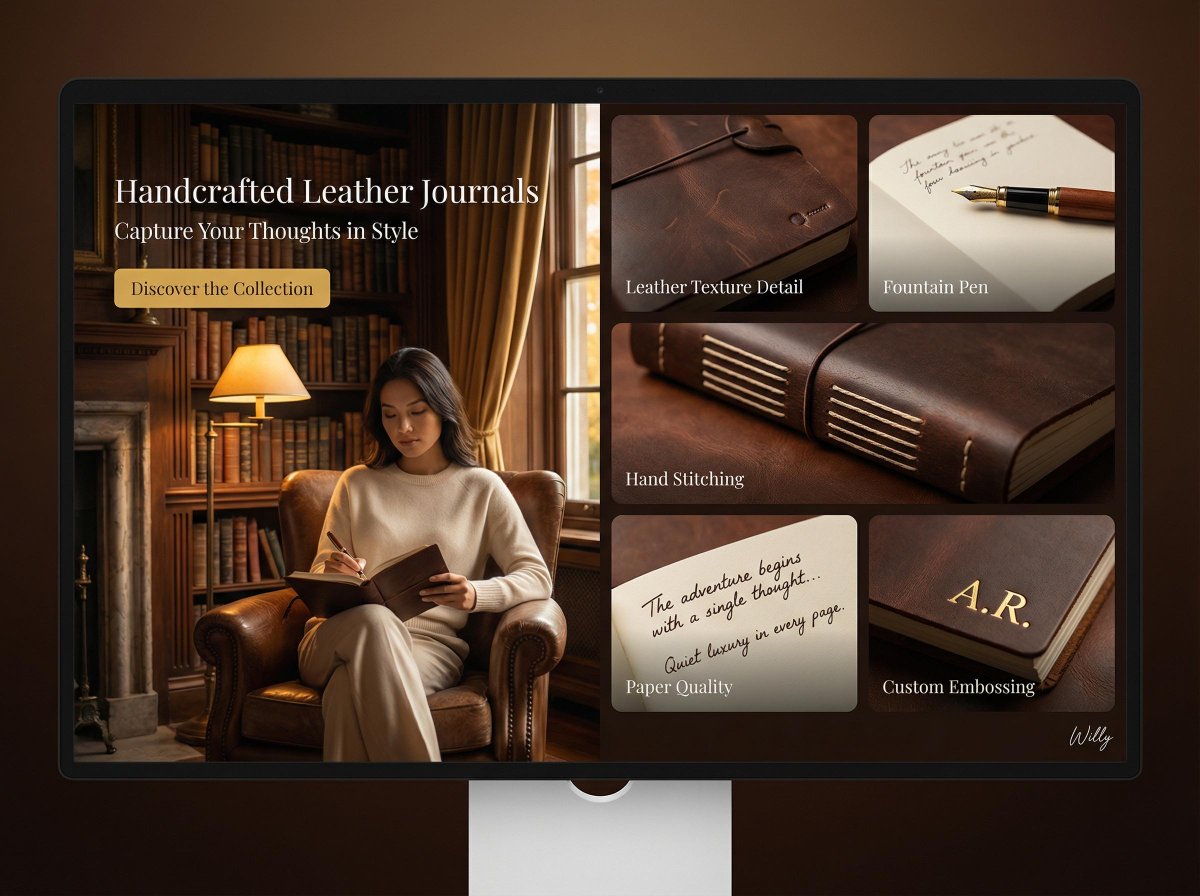
Cozy and inviting library interior product showcase, desktop landing page, 16:9 ratio. PAGE TYPE: Landing page - promoting a new line of handcrafted leather journals LAYOUT: Split screen - left image hero, right bento grid of detail cards HERO SECTION (left): - Image: Woman with Eurasian features, wearing a cream cashmere sweater, seated in an armchair in a softly lit library, writing in a journal with a fountain pen - Text: Handcrafted Leather Journals - Capture Your Thoughts in Style - CTA: Discover the Collection BENTO GRID (right): - Card 1 (top left): Leather Texture Detail - close-up of journal cover, highlighting leather grain - Card 2 (top right): Fountain Pen - elegant fountain pen resting on open journal page - Card 3 (middle): Hand Stitching - detail of meticulous hand stitching on the spine - Card 4 (bottom left): Paper Quality - close-up of high-quality paper texture with handwritten script - Card 5 (bottom right): Custom Embossing - example of personalized embossing on the cover BACKGROUND: Softly lit library - warm wood shelves filled with books, antique desk lamp, leather armchair LIGHTING: Rembrandt lighting - single light source creating dramatic shadows, golden hour effect TONE: Warm earth tones - browns, creams, gold accents, rich mahogany STYLE: Quiet luxury - elegant, understated, focus on craftsmanship CAMERA: Hasselblad H6D, 85mm f/1.2, shallow depth of field Style keywords: handcrafted, leather, journal, quiet luxury, library, warm, texture. A stylish handwritten signature Willy is elegantly and small letters placed at the Bottom Right corner

Architectural Interior Style Transformation with Depth Map Constraint

Architectural Interior Style Transformation with Depth Map Constraint

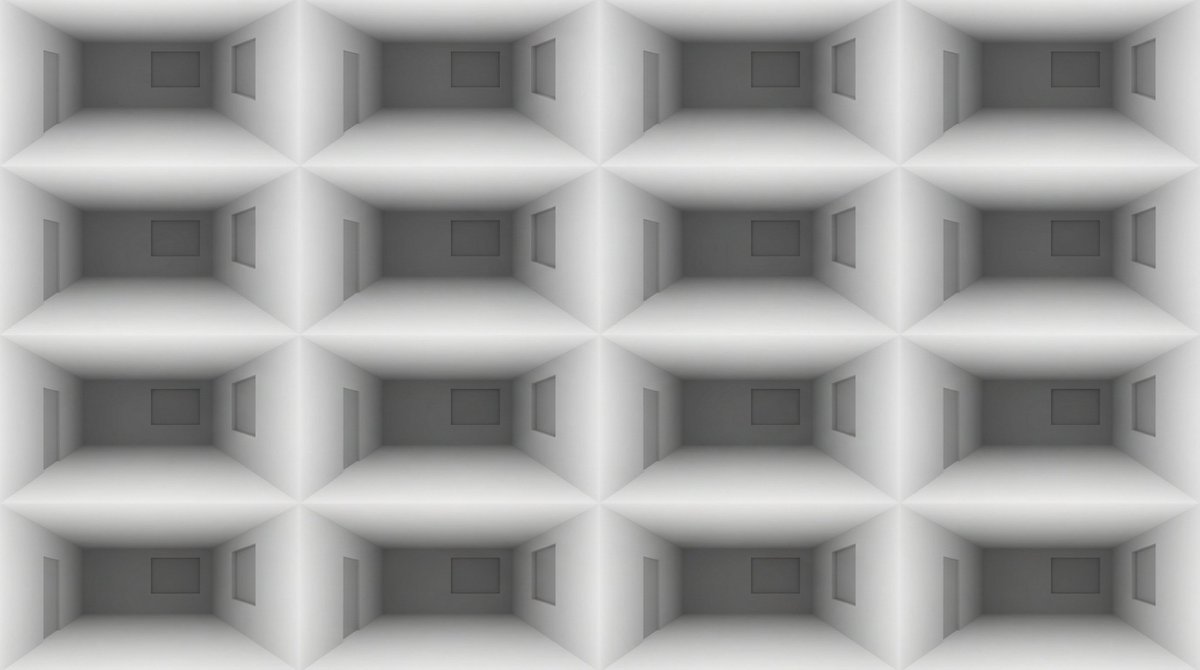
Professional architectural photography 4x4 grid showcasing identical room layout transformed through {argument name="number of distinct styles" default="16"} distinct interior design styles. All furniture placement, room geometry, and spatial composition must exactly match the provided depth map reference. Camera: consistent {argument name="camera angle" default="3/4 angle"}, 24mm tilt-shift lens, f/8, tripod-mounted. Only materials, colors, textures, and decorative elements change—never position or scale of objects.CRITICAL CONSTRAINT: Furniture placement, room dimensions, window/door positions, and all object locations must remain pixel-perfect identical to the reference depth map across all {argument name="number of distinct styles" default="16"} frames. The silhouette and spatial arrangement cannot change.

Hyper-realistic macro photography of tiny humans on a WhatsApp speech bubble bridge

Hyper-realistic macro photography of tiny humans on a WhatsApp speech bubble bridge

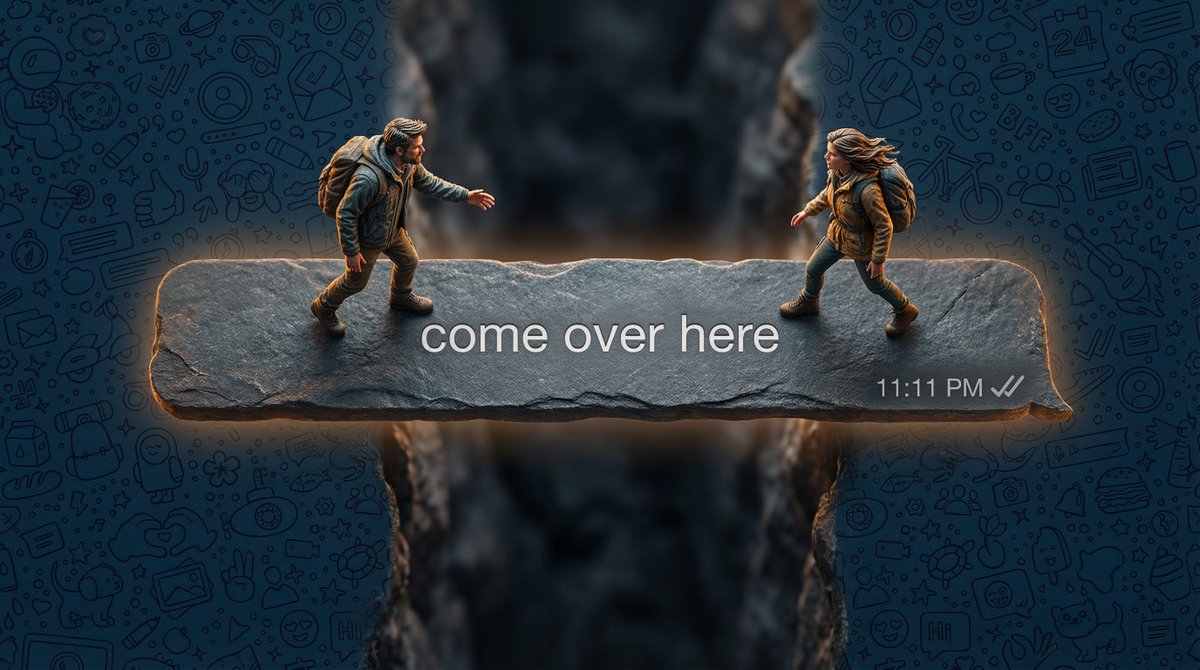
Hyper-realistic top-down macro photography. A long, dark-grey WhatsApp speech bubble (outgoing message style) acting as a narrow stone bridge over a deep void. Two real living humans—a man and a woman shrunk to tiny scale—are cautiously walking toward each other from opposite ends. They are NOT plastic figures; they have visible skin texture, wind-blown natural hair, and realistic fabric textures on their hiking gear. One person is reaching out a hand. The text inside the bubble reads: '{argument name="bubble text" default="come over here"}'. Bottom right has a timestamp '{argument name="timestamp" default="11:11 PM"}' and grey ticks (unread). The background is completely filled with a high-density, seamless WhatsApp doodle pattern in a deep midnight blue, covering the entire surface edge-to-edge. Professional cinematic lighting with a slight glow emitting from the bubble’s edges, 8k resolution, sharp focus on the people.

Gemini Prompt for Generating New Year's Blessing Website

Gemini Prompt for Generating New Year's Blessing Website

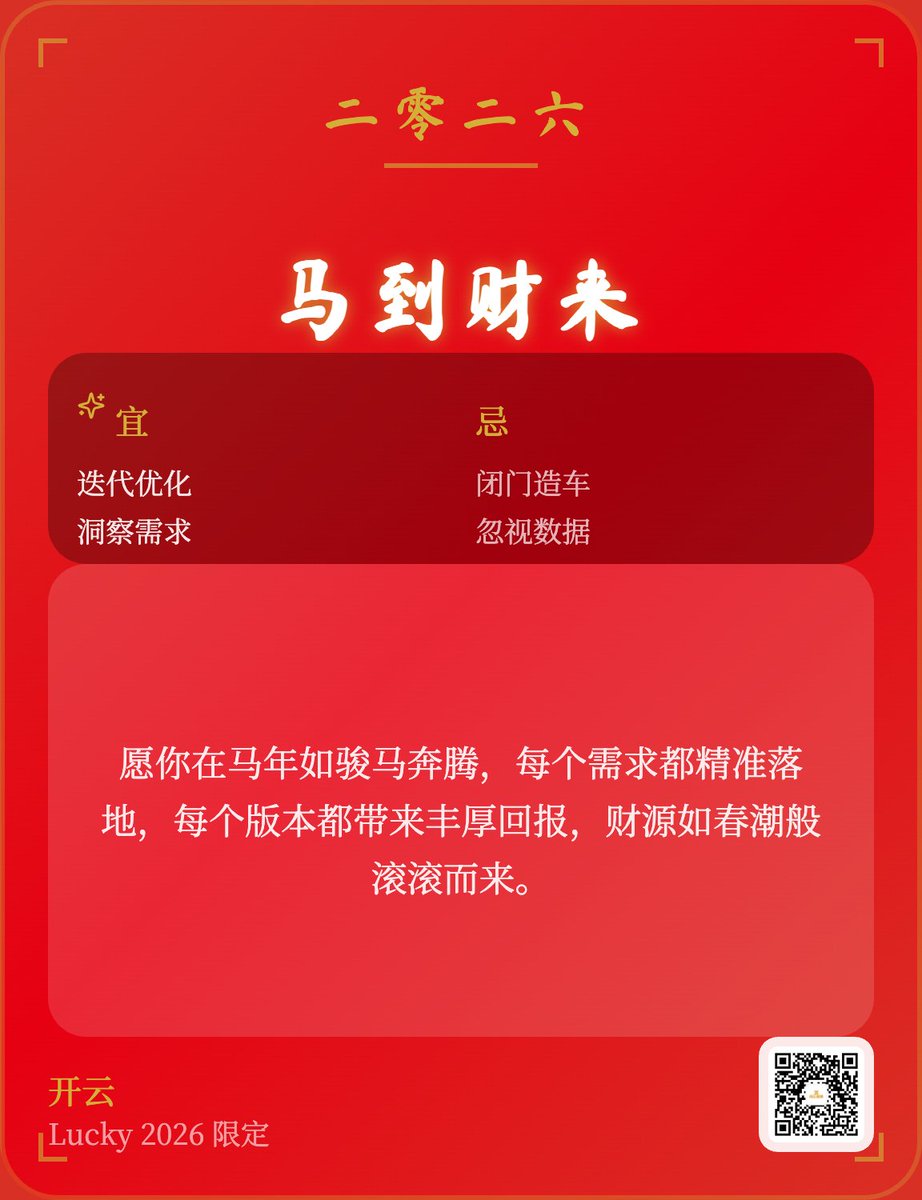
Leveraging the New Year's Eve transition from 2025 to {argument name="year" default="2026"}, I want to design a web application that supports generating blessings and wallpapers, which can be directly saved as images (9:16). Help me design such an application and try to make it highly shareable and capable of viral growth.

Japanese New Year Kirie-Style Icon Set Generation

Japanese New Year Kirie-Style Icon Set Generation

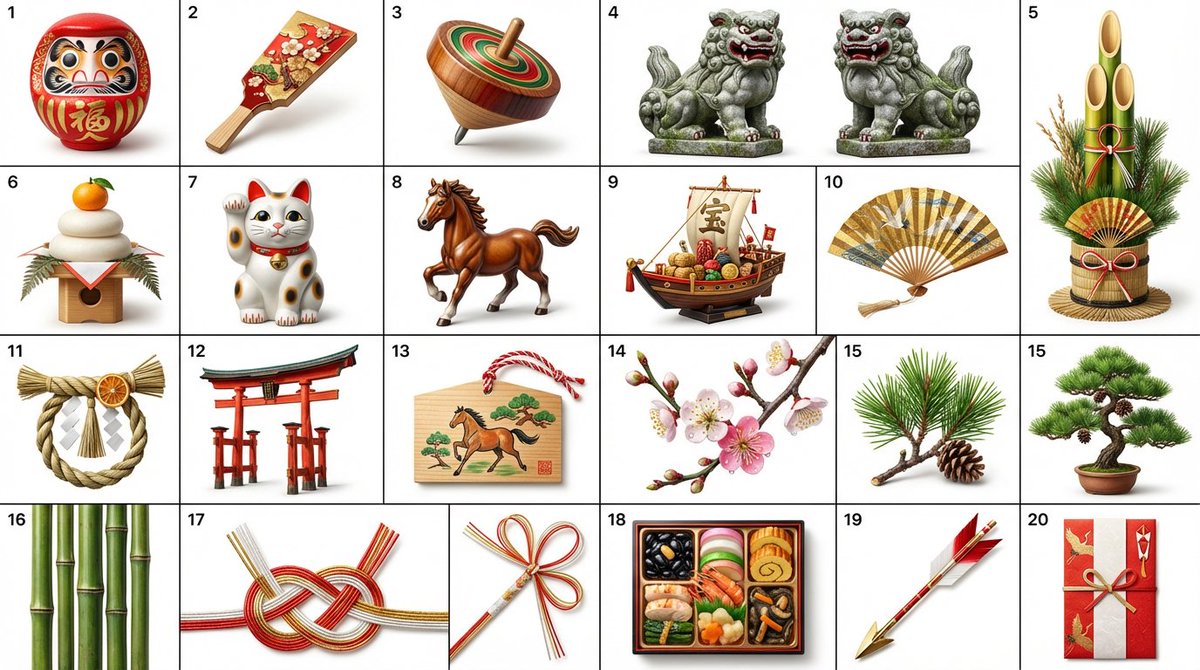
Create icons in a Kirie (paper-cutting) style featuring Japanese New Year decorations (such as {argument name="New Year decorations" default="Daruma, Hagoita, Koma, Komainu, Kadomatsu, Kagami Mochi, Maneki Neko, Horse"}). The icons are arranged neatly in 4 rows and 5 columns, ordered sequentially from left to right, top to bottom. Each icon has a numbered label indicating its sequence in the top-left corner.

Medium Shot of Character Interacting with Floating Interface

Medium Shot of Character Interacting with Floating Interface

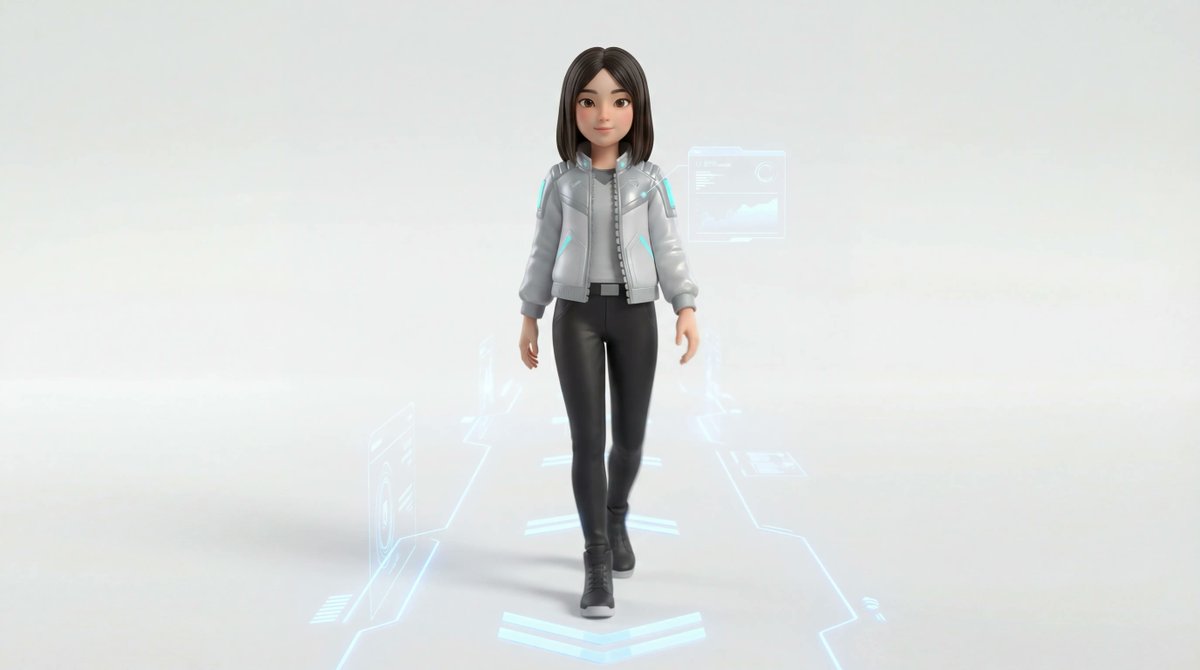
{argument name="Character Name" default="Mia"} Medium shot of the 3D character gently reaching out to turn off a transparent floating interface panel, other panels fading softly, warm light slowly replacing cool tones, calm, focused expression, modern minimal environment, emotional realism, clean composition

Moody Gaming Desk Portrait with X Profile Detail

Moody Gaming Desk Portrait with X Profile Detail

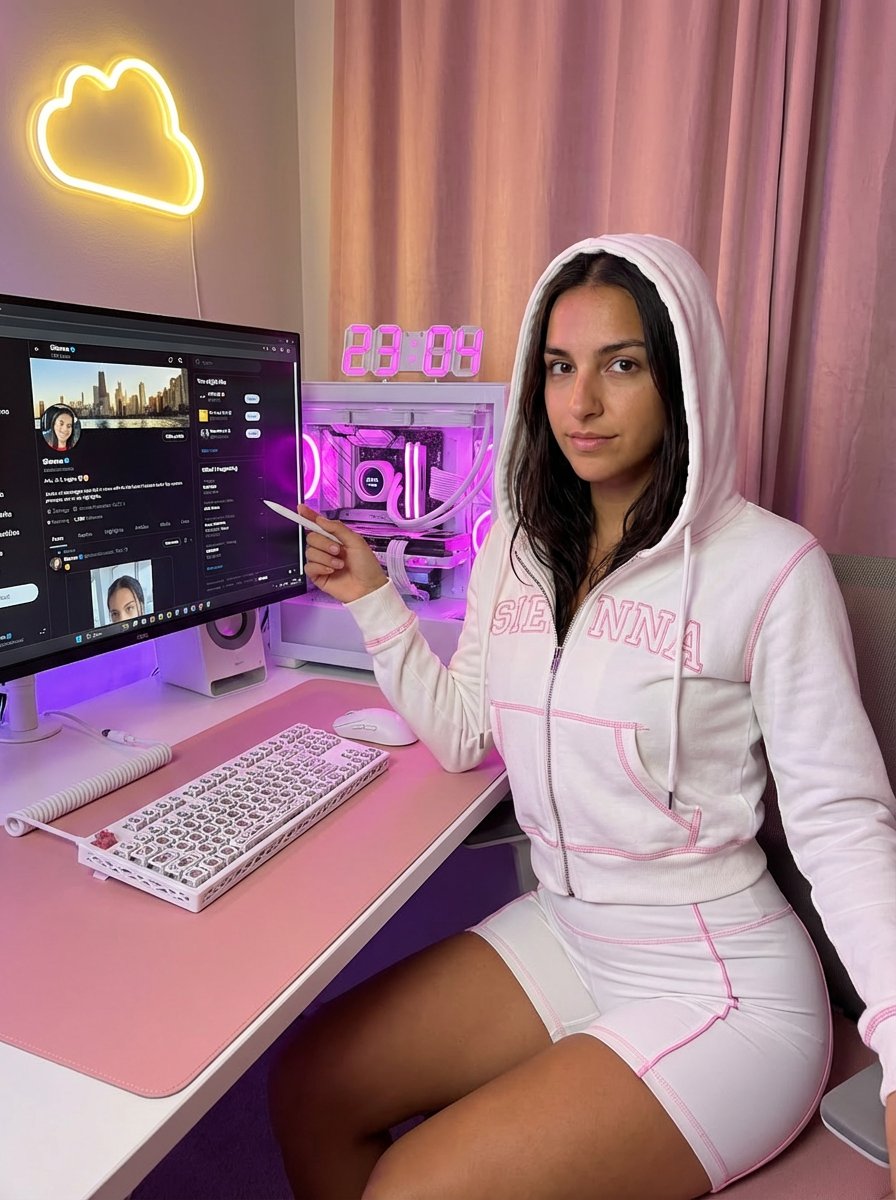
{ "aspect_ratio": "3:4", "subject_pose": "A medium-long distance photograph capturing a woman sitting in a chair at a computer desk. The frame is wide enough to clearly show her entire body from the waist down to her feet resting on the floor under the desk. Her torso is turned slightly to the right, while her head is tilted slightly right, looking directly back at the camera. Her right arm rests on the edge of the desk, with her hand near a keyboard. Her left arm is bent upwards, holding a small object (like a stylus) between her index finger and thumb, pointing it toward the computer monitor. Her lips are slightly parted. Natural office lighting.", "face": "Oval-shaped face with defined cheekbones, narrow eyes accentuated with black eyeliner and winged tips, thin eyebrows. lips with rose-pink lipstick, mauve undertone, high-gloss finish, juicy and plump appearance, detailed lip texture with visible specular highlights. Subtle shimmer on the skin.", "nails": "Almond French Nails.", "lighting": "Dim, low-key lighting creating a moody atmosphere with soft shadows, highlights on the skin and clothing, and overall dark tones in the room.", "camera": "Close-up shot focusing on the upper body and face, captured from a slightly elevated angle looking down at the subject.", "style": "Realistic photographic style with high detail, smooth skin textures, and natural color tones.", "environment_desk_setup": "Photo of a cozy white and pink aesthetic gaming desk setup, vertical shot. The main focus is a sleek white computer monitor displaying A sleek white computer monitor displaying a X profile page zoomed in and enlarged. The profile appears closer than normal, filling most of the screen. The “Follow” button is large, clear, and highly visible, prominently displayed. Profile photo, username, and bio are enlarged and easy to read. The first (top) tweet on the profile is clearly visible on the screen, readable and unobstructed. X UI visible, white interface, authentic platform layout. Below the monitor is a white monitor riser. On the desk: a custom white mechanical keyboard with a lattice skeletal case, a white gaming mouse, and a large pink desk mat. To the right: a white PC tower case with a glass side panel, vibrant pink and purple internal RGB lighting, white liquid cooling pipes, and a digital cooler display showing temperature.", "accessories": "A digital clock on the left showing “23:04” in pink LED numbers, a white macro pad controller.", "background": "Soft pink curtains, a warm yellow neon cloud-shaped light on the wall, ambient purple and warm lighting. Cozy atmosphere, high resolution, photorealistic, interior design photography.", "outfit": "A white two-piece matching loungewear set, Y2K aesthetic.", "top": "A tight-fitted white zip-up hoodie crop top with long sleeves, hood up. Visible bright pink contrast overlock stitching on hems and seams. Large pink cursive script typography printed

Compilation of 18 Nano Banana Pro Prompts (Tennen's Prompt Festival)

Compilation of 18 Nano Banana Pro Prompts (Tennen's Prompt Festival)

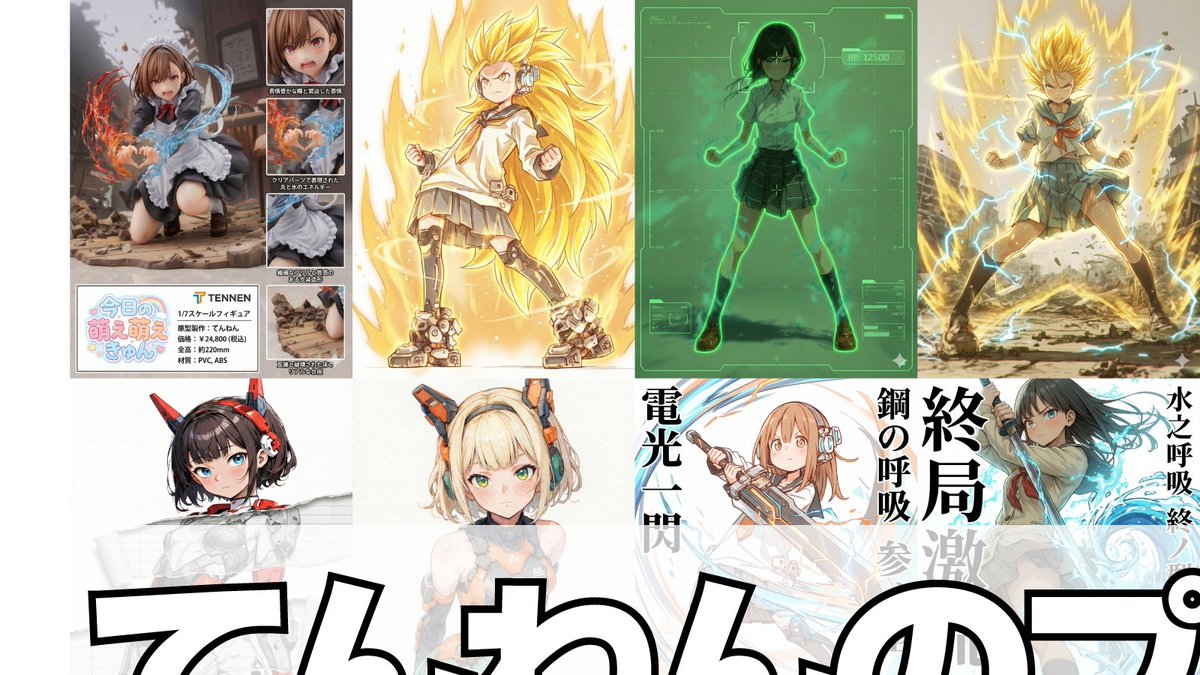
1. Scouter Prompt Overlays a Scouter-style UI onto the reference image and infers and displays the combat power based on the character's features. 2. Super Transformation Prompt Maintains the character features from the reference image and changes the pose to an 'Awakening Pose' to 'Super Transform' them. 'Super Transformation' can be selected from Form 1 to Form 3, as well as God Form, Blue Form, Extreme Form, and Rose Form. 3. Field Deployment Prompt Changes the character in the reference image to a pose with hands extended forward and deploys a field. 4. Retro RPG Status Screen Prompt A prompt that converts the character in the reference image into pixel art and generates an image styled like a retro RPG status screen. 5. Desktop Mascot Prompt A prompt that generates an image of the character from the reference image turned into a desktop mascot and placed on a PC screen. 6. Style Change Only on Torn Parts Prompt Adds a tearing effect without changing the reference image itself, allowing the art style of only the torn part to be freely switched to line art, ink painting, figure style, colored pencil, watercolor, pencil drawing, etc. 7. Art Style Conversion Prompt A prompt created by modifying the 'Style Change Only on Torn Parts Prompt' to change the overall art style. 8. Super Robot Wars Battle Sequence Prompt A prompt that generates an image styled like a Super Robot Wars battle sequence from the reference image. 9. Power Release Prompt A prompt that reproduces the depiction of a spherical energy space destroying an object. 10. Participation Screen Prompt A prompt that generates a 'Participation Screen' for the character in the reference image. 11. Total Concentration Prompt Maintains the character from the reference image and infers and depicts 'Weapon, Breathing Style, Form, and Move Name' from the character's atmosphere and stance. 12. Kamehameha Style Prompt A prompt that can stably generate the charging pose and activation pose of 'Kamehameha.' 13. Figure Transformation + Product Introduction Layout Prompt A prompt that transforms the character in the reference image into a figure and lays it out in a product introduction style. 14. Final Flash Style Prompt Converts the character in the reference image into the activation, charging, and firing poses of 'Final Flash.' Dialogue and sound effects can be added to each. 15. New Profile Image Generation Prompt Generates the character from the reference image in an arbitrary aspect ratio and places an arbitrary string as a logo in an arbitrary position. 16. Plastic Model Package Prompt Generates an image styled like a 'Plastic Model Package' by placing the reference image on the front and side. 17. Eraser Gun Style Prompt The character in the reference image emits an Eraser Gun-style energy wave from their mouth. 18. Ragged Transformation Prompt A prompt that transforms the character in the reference image into 'rags.'

Nano Banana Pro Prompt Collection Summary (20 Prompts)

Nano Banana Pro Prompt Collection Summary (20 Prompts)

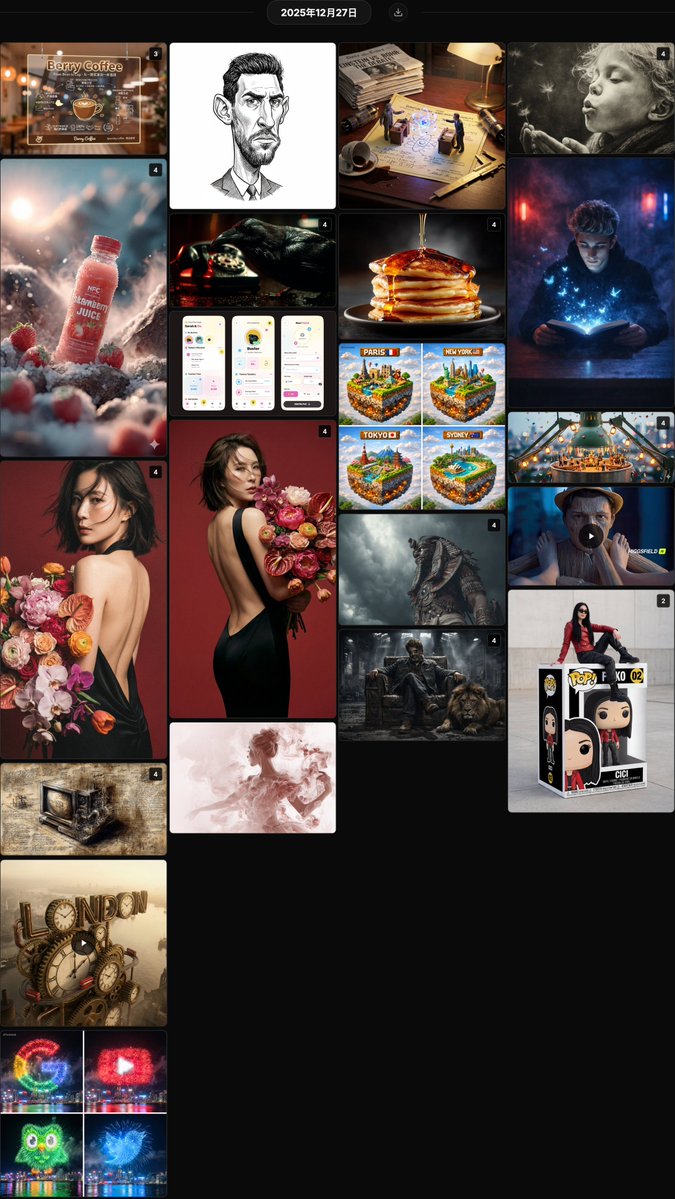
@hx831126 Fashionable backless photo shoot prompt sharing, combined with uploaded facial features to generate high-end magazine style portraits, with realistic and natural details @berryxia Sharing a prompt template for transparent acrylic shop signs, combining hand-drawn chalk style information layout with brand display, suitable for DIY in catering, technology, and other scenarios @LudovicCreator Smoke moment art prompt template, creating a fragile and fleeting atmosphere with soft blurred edges and dreamy charcoal texture @AllaAisling Liquid pouring product photography prompt, capturing the moment fluids like honey, paint, or milk make contact, creating an appealing sensory texture @anandh_ks_ Gangster king and lion cinematic style prompt, combining absolute facial lock with an industrial ruin scene, creating a strong sense of authority @TechieBySA Fireworks brand Logo prompt sharing, using night sky fireworks to accurately replicate the colors and shapes of logos like Google and YouTube @azed_ai Epic cinematic cultural fusion prompt, using symbolic armor and dramatic lighting to create a grand atmosphere for cross-cultural warriors @Arminn_Ai Giant Funko Pop toy box prompt, featuring a real person sitting in a custom package, with collector-grade detail restoration @YaseenK7212 Strawberry juice advertising photography prompt series, combining natural environment and condensation droplets to create a fresh and appealing commercial visual @David_eficaz Political cartoon style exaggerated portrait JSON prompt, emphasizing facial features with fine ink lines and shadows in an editorial style @RobotCleopatra Da Vinci manuscript style modern object prompt, restoring Renaissance aesthetics with ink line cross-sections and mirrored annotations @Gdgtify London city clockwork mechanical giant text prompt, dynamically blending Victorian gears with a red bus @aleenaamiir Miniature festival prompt on the edges of everyday objects, vividly narrating a story with small figures, lanterns, parties, and cinematic wide-angle close-ups @TechieBySA Minecraft style floating city cube prompt, building fun visuals with iconic landmarks and voxel sky @hx831126 Analysis of backless photo facial consistency prompt, using close-up half-body composition to improve identity feature retention rate @LudovicCreator Smoke art QT interactive prompt, capturing the fleeting, dreamy moment of the subject with a soft charcoal texture @Gdgtify Scientists' war macro diptych prompt, featuring miniature duels between historical rivals on patent drawings for educational fun @itis_Jarvo33 Mysterious smoky room magic book prompt, creating an immersive reading atmosphere with blue light, butterflies, and flocks of birds @RobotCleopatra Neo-noir cinematic golden prompt, recreating the classic atmosphere with Venetian blind shadows, smoke, and tungsten light effects @mattiapomelli Whimsical interface design for a pet management App, full of vitality with saturated colors, hand-drawn lines, and cartoon elements

Hyper-Realistic POV Smartphone Pop-out Illusion in a Park

Hyper-Realistic POV Smartphone Pop-out Illusion in a Park

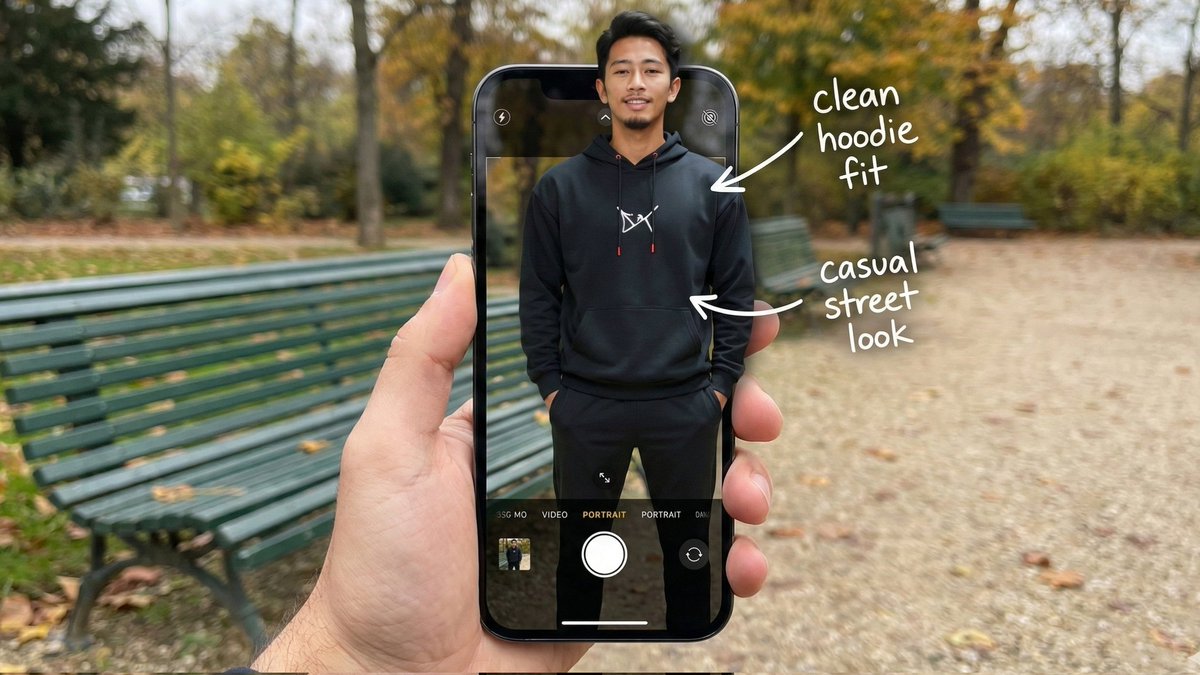
{ "image_metadata": { "format_version": "2.1.0", "aspect_ratio": "16:9", "shot_type": "Composite Hyper-Realistic POV", "concept": "OOTD Breakdown / Smartphone Pop-out Illusion (Outdoor Park)" }, "subject_profile": { "identity": { "gender": "Male", "ethnicity": "{argument name="ethnicity" default="Asian"}", "age_range": "20-25 years old", "identity_consistency": "preserve face and body like reference image" }, "facial_architecture": { "facial_hair": "light mustache and beard", "jawline": "defined and proportional", "expression": "relaxed confident smile", "skin_rendering": "warm tan, natural texture" }, "hair_mechanics": { "color": "black", "style": "short with volume, brushed back", "texture": "natural sheen, realistic strand breakup" }, "body_anatomy": { "frame": "lean, proportional", "posture": "standing straight, hands in hoodie pockets" } }, "wardrobe_and_styling": { "top_layer": { "item": "black hoodie", "details": "white chest logo, red string tips", "material": "matte cotton fleece" }, "bottom_layer": { "item": "black jogger pants", "fit": "clean streetwear silhouette" }, "footwear": { "item": "black sneakers", "visibility": "lower frame inside UI" } }, "device_and_interface": { "hardware": { "model": "modern high-end smartphone", "case": "matte black", "hand_interaction": "male POV holding phone in foreground" }, "software_ui": { "app": "iOS Camera Interface", "elements": [ "white shutter button", "PORTRAIT mode (active)", "focus box on subject's face" ], "screen_condition": "OLED brightness, crisp pixels" }, "augmented_overlay": { "style": "white handwritten annotations", "notes": [ { "text": "clean hoodie fit", "pointer": "upper body" }, { "text": "casual street look", "pointer": "torso" } ] } }, "environment_optics": { "location": "{argument name="location" default="public park"}", "background_elements": { "bench": "green metal park bench", "ground": "gravel path with scattered leaves", "trees": "surrounding foliage, greenery" }, "lighting_design": { "source": "natural daylight", "quality": "soft overcast, diffused shadows", "mood": "relaxed, cinematic outdoor ambiance" } }, "technical_execution": { "optics": { "lens": "35mm macro / smartphone equivalent", "depth_of_field": { "foreground": "sharp (phone + subject)", "background": "soft bokeh park depth" } }, "special_effects": { "illusion": "3D pop-out; torso out of screen, lower body inside UI", "realism": "accurate edge lighting and natural shadow blending" } }, "safety_and_exclusions": { "negative_prompt": [ }

Singer AR Floating Play Card Effect

Singer AR Floating Play Card Effect

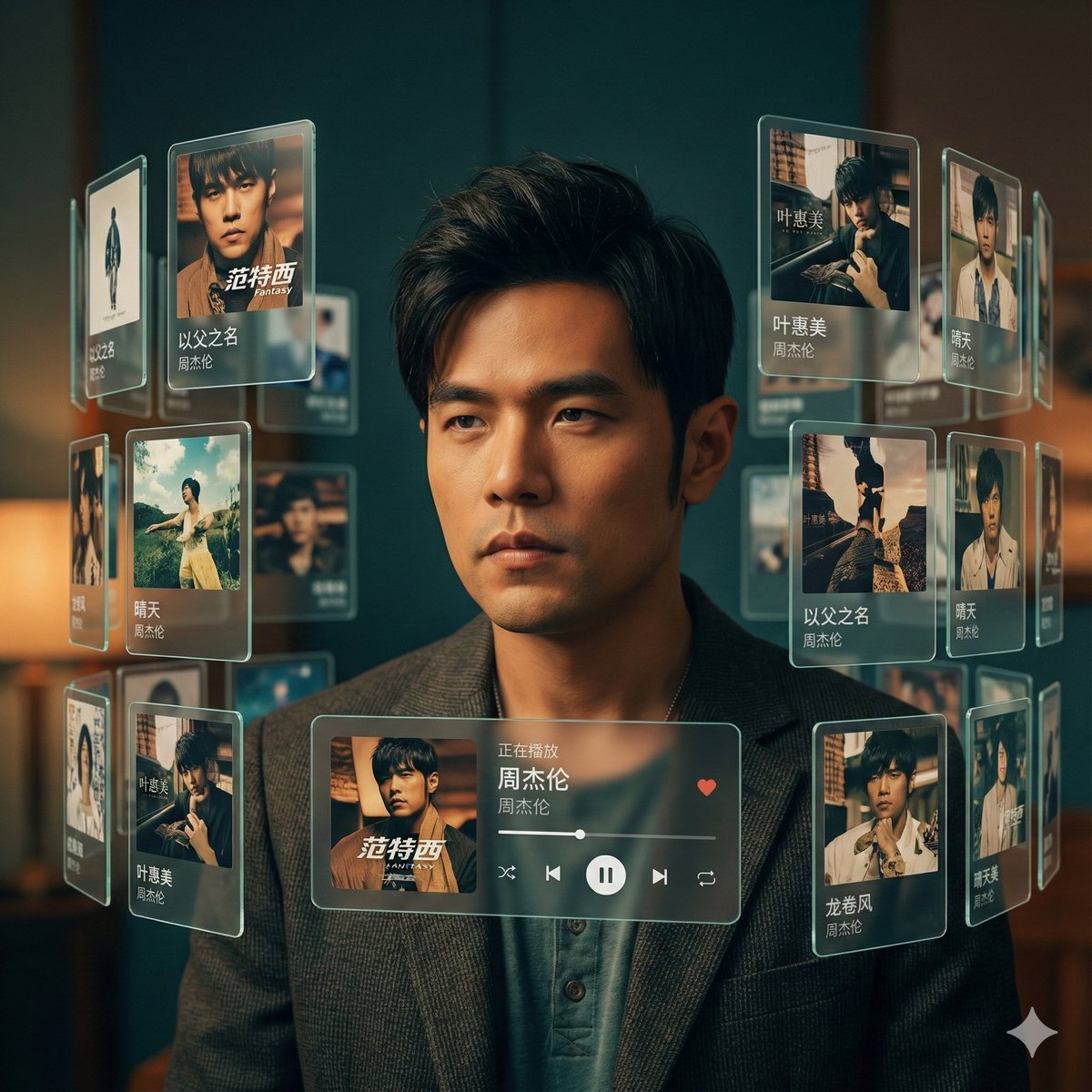
Singer AR Floating Play Card Effect. Creates a mysterious atmosphere where the singer's classic songs surround them like an AR floating play card. Nano Banana Pro's portrait effect is great! The prompt below allows you to customize your favorite {argument name="singer" default="singer"}.

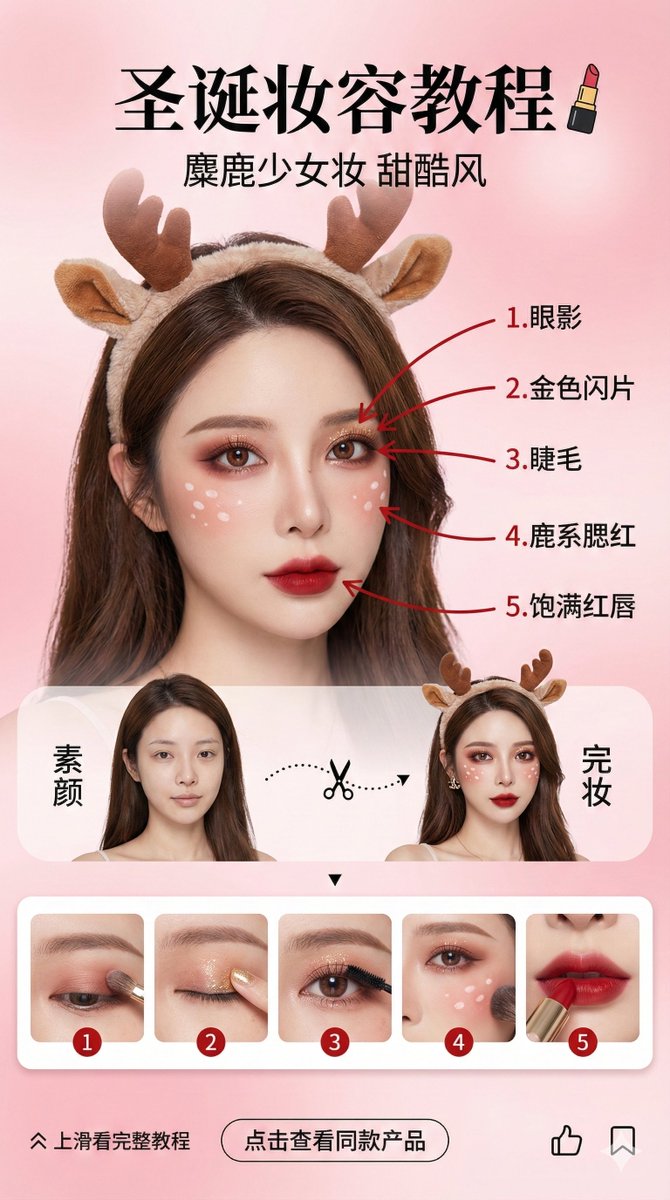
Beauty Vlogger Christmas Makeup Tutorial Interface

Beauty Vlogger Christmas Makeup Tutorial Interface

Vertical social media story design (9:16 aspect ratio), beauty vlogger Christmas makeup tutorial interface. Background is a soft, high-end pink gradient, creating a sweet and dreamy atmosphere. Core Visual: Character Consistency (Highest Weight): The center of the image features an Asian female beauty vlogger. Facial features, features, and hairstyle must strictly and perfectly replicate the person in the uploaded reference image. Makeup and Accessories: Extremely delicate “Christmas Reindeer Sweet Cool Makeup.” Eye makeup is red-brown blending, with white fawn spots on the face, wearing a fluffy reindeer antler headband. Red Pen Markings and Step Correspondence (Core Logic): On the face of the finished character on the right, use a striking red ink pen to draw 5 indicator lines, pointing to 5 key parts of the makeup, and label them sequentially in Chinese: 1. Eyeshadow; 2. Gold Glitter; 3. Eyelashes; 4. Reindeer Blush; 5. Full Red Lips. Layout: Top: Chinese title “Christmas Makeup Tutorial,” paired with a lipstick icon. Subtitle “Reindeer Girl Makeup Sweet Cool Style.” Middle (Comparison Area): Split-screen design. The left side is the character “Bare Face,” the right side is “Finished Makeup.” Connected by a dashed line and a scissor icon in the middle. Bottom (Strongly Associated Step Preview Area): Set a horizontally scrolling rounded card bar, displaying 5 step images that strictly correspond to the facial markings: Card 1: Close-up of applying eyeshadow to the eye area; Card 2: Close-up of dotting gold glitter with a finger; Card 3: Close-up of curling or brushing eyelashes; Card 4: Close-up of sweeping blush and drawing fawn spots on the cheek; Card 5: Close-up of lips applying red lipstick. Each card's top-left corner must clearly label numbers 1-5, corresponding to the red pen markings on the face. Bottom (Interaction Area): “Swipe up for full tutorial” arrow, “Click to view product” button, like and save icons. Style: High-definition commercial photography texture combined with UI design, transparent light and shadow, vivid colors, delicate and realistic skin texture, fashion magazine layout style. --ar 9:16

Wireframe Grid Overlay Prompt

Wireframe Grid Overlay Prompt

"semi-transparent 3D wireframe grid overlay in {argument name="grid color 1" default="blue"} horizontal lines and {argument name="grid color 2" default="red"} vertical lines to show volume, like a digital modeling sketch." + "photo faded to 50% opacity for emphasis on the grid" + "show only the grid, white bg"

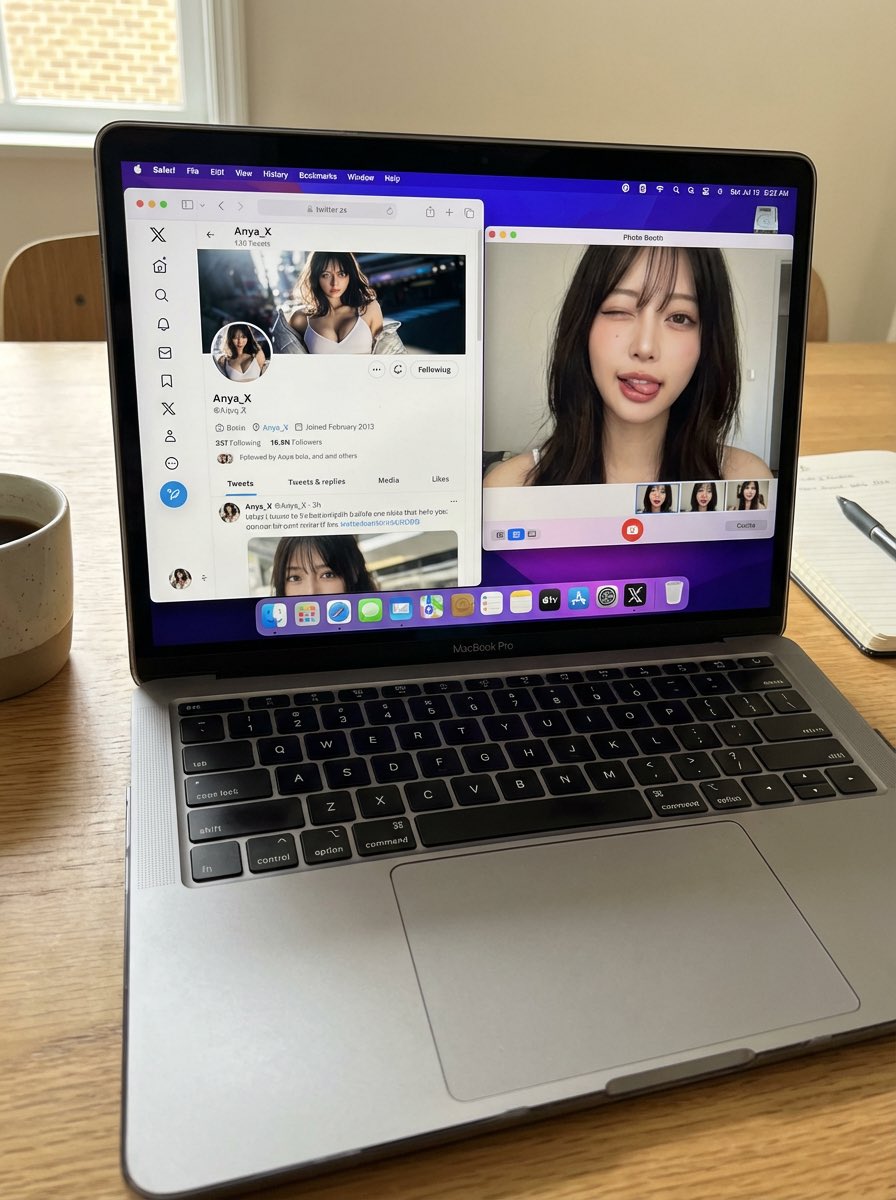
Photorealistic MacBook Desktop Selfie Scene

Photorealistic MacBook Desktop Selfie Scene

A candid, realistic still image of a MacBook Pro on a desk. The screen shows Safari open with X (Twitter), displaying my own X account. All UI elements must be accurate and authentic — no generic or incorrect follow buttons. My profile picture is clearly visible, and the same profile image also appears in the macOS side dock. Next to Safari, Photo Booth is open, showing a webcam selfie of me (the same person as in the profile picture). In the selfie, I am looking directly into the camera, making a cute and playful funny face — slightly exaggerated but charming, casual, and natural. Do not change my face or identity in any way. No gibberish or unreadable text anywhere on the screen. The phone (if present) remains completely still. Flat, natural lighting. Normal, realistic image quality — not cinematic, not overly stylized. Photorealistic, everyday desktop environment with a casual, authentic snapshot feel.

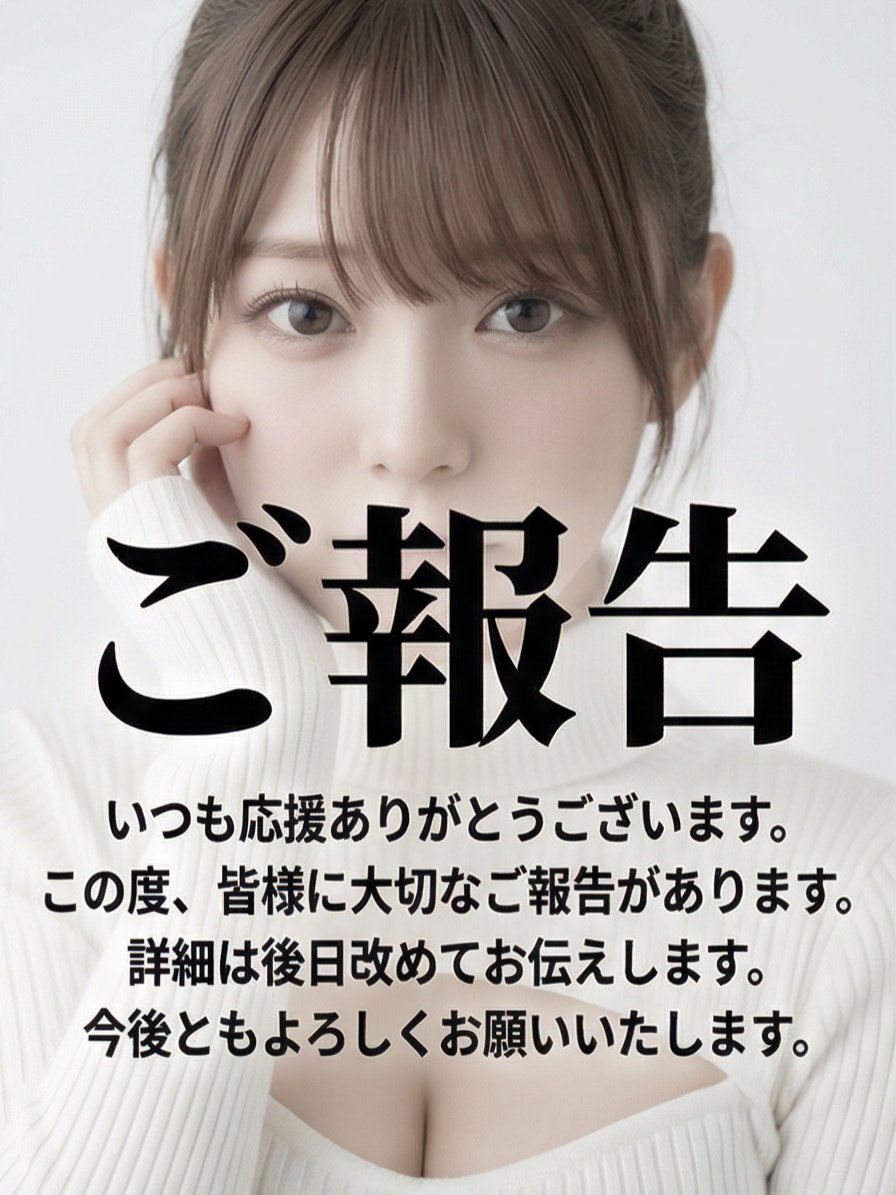
Multi-Angle Grid Portrait with Overlay Text (Japanese)

Multi-Angle Grid Portrait with Overlay Text (Japanese)

Read the motifs depicted in the attached image, generate multi-angle shots, and create four scenes divided into a 2x2 grid. Remix and edit with dynamic poses. subject: - Close-up portrait of the person. - Looking directly at the camera with a slightly tense or embarrassed expression. - The chest is slightly exposed, showing part of the collarbone and cleavage. - Large black Japanese text (Gothic or bold font) is centrally overlaid across the entire image, obscuring most of the face and body. This text is an announcement in the style of an SNS post, starting with "ご報告" (Report/Announcement). The announcement text is automatically generated by the AI. style: - Graphic design for social media posts. - Ultra-high resolution digital portrait with a strong smoothing filter applied. - Saturation and contrast are intentionally lowered in post-production, functioning as a background to emphasize the text. - High-key and fantastical atmosphere. composition: - Vertical portrait (tall orientation). - Close-up bust shot. The upper part of the woman's face (forehead) is slightly cropped. - The subject is centered in the frame, and the text dominates the center. - The background is completely blurred due to shallow depth of field (bokeh). - The text is vertically aligned with the image. lighting: - Uniform and very soft front light (ring light or softbox) is used. - Almost no shadows, flat lighting. - Overall very bright (high-key) tone. - Color temperature is neutral to slightly cool white light. colors: - Minimal palette consisting mainly of white, light gray, and black for the text. - The color of the woman's skin and lips is very pale, with extremely low saturation. - Overall, a near-monochrome color scheme. technical_specs: - Digital photograph. - Aspect ratio: 4:5 or 3:4 mobile portrait format. - Strong soft focus effect and glow style filter (luminescence). - Reproduction of the overlaid Japanese text (including font size, line spacing, and placement).

部分提示词收录自 X 平台创作者,版权归原作者所有。